
If you’re trying to build a smarter, more connected home, you’ve likely realized how confusing device compatibility and automation standards can be. With new platforms, hubs, and wireless protocols entering the market every year, it’s hard to know which technologies will actually work together — and which ones will leave you troubleshooting for hours.
This article is designed to simplify that process by breaking down the essentials of modern smart home connectivity, with a clear focus on how a thread protocol guide can help you create a faster, more reliable, and future-ready setup. We’ll explain what Thread is, how it differs from traditional Wi‑Fi and Bluetooth connections, and why it’s becoming a foundational standard for connected living.
Our insights are based on ongoing analysis of smart home innovations, automation protocols, and real-world device integration trends — so you get practical, up-to-date guidance you can confidently apply to your own home.
Smart lights that ignore you and sensors that vanish aren’t glitches—they’re network failures. Most homes rely on Wi‑Fi, a hub‑and‑spoke system (one router talks to everything). When that hub stutters, everything does.
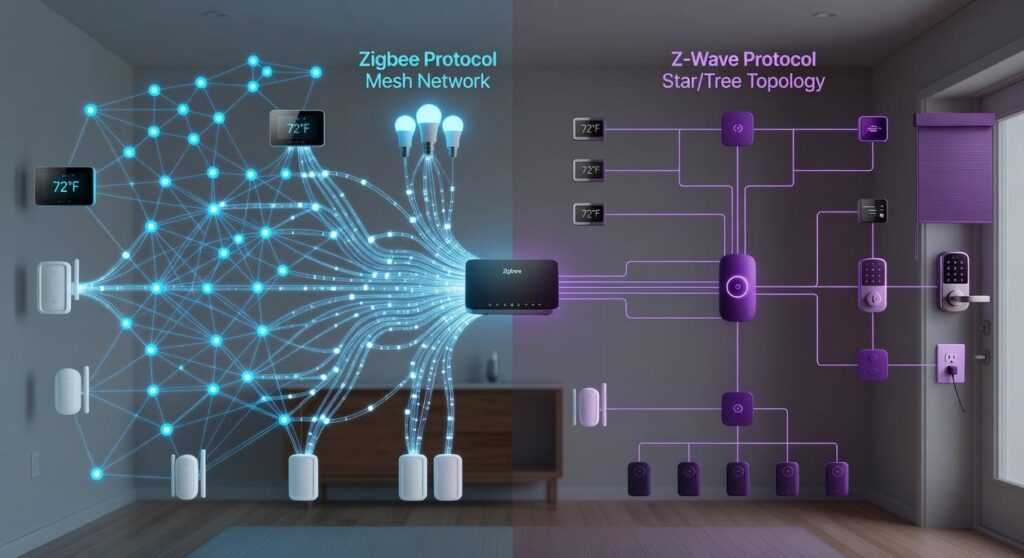
Thread fixes this with a mesh network, meaning each device relays signals for the others, creating a self-healing path if one drops. Think less diva soloist, more choir.
To set it up, first confirm your hub supports Thread and Matter. Next, place border routers. Then, space devices to strengthen the mesh. Finally, follow a thread protocol guide to optimize channels and firmware.
Do this, and everything responds instantly.
The Three Pillars of a Rock-Solid Thread Network
A reliable Thread setup rests on three essential pillars—and if one wobbles, the whole smart home feels it.
1. Border Router
Think of this as the translator at the United Nations of your home. It connects your Thread network to Wi-Fi or Ethernet, letting devices talk to apps and the internet. Without it, your automations stay local (which some privacy advocates prefer). Still, as smart homes expand, I predict border routers will become standard in routers and TVs—almost invisible, like Bluetooth today.
2. Thread Routers
These are mains-powered devices—smart plugs, bulbs, switches—that extend the mesh. A mesh network means devices pass messages along like a relay team. The more routers you add, the stronger the coverage (yes, even that one outlet in the garage).
3. End Devices
Battery-powered sensors connect to the nearest router but don’t repeat signals. They conserve energy while keeping your home responsive.
For deeper setup insights, see a thread protocol guide.
Guideline #1: Master Your Network’s Foundation with Strategic Border Router Placement
First, define the star of the show. A Border Router is the device that bridges your Thread network (a low-power mesh protocol for smart devices) to your main Wi‑Fi network so everything talks smoothly. Think of it as mission control for your smart home (yes, very NASA).
The Central Command Rule
Place your primary Border Router—like a HomePod Mini or Nest Hub—centrally and equidistant from high-traffic smart devices. In practical terms, that usually means a main living area, not a far corner office. Central placement improves mesh reliability because Thread devices relay signals to one another, and shorter hops mean stronger connections (Thread Group, 2023).
Avoiding Interference
Next, keep it away from dense materials like concrete and large metal appliances, which absorb or reflect 2.4 GHz signals. Also avoid microwaves and older cordless phones—both operate on 2.4 GHz and can cause interference (FCC guidance on unlicensed spectrum use). If your smart lights lag when popcorn’s cooking, now you know why.
The Redundancy Principle
Finally, install at least two Border Routers in large or multi-story homes. This creates failover—automatic backup if one device disconnects. Pro tip: place the second unit on a different floor for vertical coverage. For deeper optimization, consult a thread protocol guide and map device density before final placement.
Guideline #2: Build a Self-Healing Mesh with Smart Device Distribution
First, let’s talk about the “More is More” rule for routers. In a Thread network, a Thread Router (a mains-powered device that passes messages along) strengthens the entire system. The more routers you have—ideally one per room—the more resilient your network becomes. Think of it like adding extra cell towers in a city; coverage improves and dead zones shrink (and no one likes buffering in the middle of movie night).
However, some argue that one or two routers should be enough in a small home. While that can work, it ignores how walls, appliances, and interference disrupt signals. A distributed setup ensures reliability, not just basic connectivity.
Next, create pathways. Smart plugs and compatible light bulbs act as routing nodes, forming multiple communication paths. If one device goes offline, the network automatically re-routes data—a “self-healing mesh.” This is similar to how bluetooth mesh supports smart device communication: redundancy keeps everything running smoothly.
Finally, bridge the gaps. Place a Thread Router in transitional spaces like hallways to connect distant rooms. If you’re wondering what’s next, consult a thread protocol guide to optimize placement and future-proof expansions.
Guideline #3: Respect Device Roles for Optimal Battery Life and Speed

First things first: not all smart devices are built to be social butterflies. Battery-powered sensors—like motion or contact sensors—are what Thread calls End Devices. That simply means they conserve power by “sleeping” most of the time. They wake up, send their update, and go right back to nap mode (honestly, relatable). What they won’t do is act as routers to extend your network. They can’t—and that’s by design.
So, when planning your setup, start with mains-powered Thread devices. These act as Thread Routers, forming the backbone of your mesh. Think of them as extroverts at a party, happily passing messages along. Pro tip: build this backbone first before adding a crowd of sleepy sensors.
Now, if battery devices keep dropping offline, don’t blame the batteries. More often than not, it signals a weak mesh. Add more routers nearby. For deeper context, check a thread protocol guide to understand how roles impact performance.
Quick Fixes for Common Thread Communication Errors
Is one of your devices suddenly ignoring you? Before you blame the gadget, ask yourself: is there a nearby Thread Router? If not, add a smart plug between the device and the closest router to extend coverage. Thread (a low-power mesh networking protocol for smart homes) relies on neighbors to pass messages along—no neighbors, no conversation.
Experiencing network-wide lag? Could your Border Router be overwhelmed or stuck in Wi-Fi interference traffic? Try nudging it a few feet or rebooting. Sometimes it’s that simple.
New device refusing to join? Bring it closer first. Secure pairing matters—don’t skip this step. For deeper troubleshooting, consult a thread protocol guide.
Achieving a Truly Automated and Responsive Home
An unreliable smart home isn’t just annoying—it breaks trust. Lights lag, sensors drop, automations fail (usually when you’re showing them off). The fix isn’t buying more gadgets; it’s following a clear thread protocol guide and tightening your setup.
Why it works:
- Strategic device placement strengthens your mesh network.
- Building redundancy prevents single points of failure.
- Understanding device roles (Router vs. End Device) keeps traffic flowing smoothly.
Some argue Wi-Fi alone is “good enough.” It’s not—Thread’s low-latency mesh is built for resilience (see Thread Group documentation).
Recommendation: Audit weak spots today and add one more Thread Router where signals struggle. Pro tip: Start centrally, not peripherally.
Bring Your Smart Home Together with Confidence
You started this journey to understand how thread-based communication can simplify and strengthen your smart home setup. Now you know how it improves device reliability, reduces latency, and creates a more resilient connected environment.
The frustration of dropped connections, incompatible devices, and constant troubleshooting doesn’t have to define your smart home experience. With the right foundation and a clear thread protocol guide, you can build a system where your devices communicate seamlessly and respond instantly.
Your next step is simple: review your current setup, identify Thread-compatible upgrades, and follow a trusted thread protocol guide to ensure proper configuration and integration. Don’t let connectivity issues keep slowing you down.
If you’re ready to eliminate unreliable connections and finally enjoy a smooth, fully integrated smart home, explore our expert-backed resources and step-by-step integration tips today. Join thousands of connected living enthusiasts who rely on our proven insights to get it right the first time. Start upgrading your network now and experience the difference a truly unified system makes.
 There is a specific skill involved in explaining something clearly — one that is completely separate from actually knowing the subject. Arthuron Grantielos has both. They has spent years working with home trends update in a hands-on capacity, and an equal amount of time figuring out how to translate that experience into writing that people with different backgrounds can actually absorb and use.
Arthuron tends to approach complex subjects — Home Trends Update, Device Integration Tips, Home Automation Protocols being good examples — by starting with what the reader already knows, then building outward from there rather than dropping them in the deep end. It sounds like a small thing. In practice it makes a significant difference in whether someone finishes the article or abandons it halfway through. They is also good at knowing when to stop — a surprisingly underrated skill. Some writers bury useful information under so many caveats and qualifications that the point disappears. Arthuron knows where the point is and gets there without too many detours.
The practical effect of all this is that people who read Arthuron's work tend to come away actually capable of doing something with it. Not just vaguely informed — actually capable. For a writer working in home trends update, that is probably the best possible outcome, and it's the standard Arthuron holds they's own work to.
There is a specific skill involved in explaining something clearly — one that is completely separate from actually knowing the subject. Arthuron Grantielos has both. They has spent years working with home trends update in a hands-on capacity, and an equal amount of time figuring out how to translate that experience into writing that people with different backgrounds can actually absorb and use.
Arthuron tends to approach complex subjects — Home Trends Update, Device Integration Tips, Home Automation Protocols being good examples — by starting with what the reader already knows, then building outward from there rather than dropping them in the deep end. It sounds like a small thing. In practice it makes a significant difference in whether someone finishes the article or abandons it halfway through. They is also good at knowing when to stop — a surprisingly underrated skill. Some writers bury useful information under so many caveats and qualifications that the point disappears. Arthuron knows where the point is and gets there without too many detours.
The practical effect of all this is that people who read Arthuron's work tend to come away actually capable of doing something with it. Not just vaguely informed — actually capable. For a writer working in home trends update, that is probably the best possible outcome, and it's the standard Arthuron holds they's own work to.