
Choosing the right smart home protocol can feel overwhelming, especially when you’re comparing zigbee vs zwave differences and trying to decide which one fits your setup. If you’re building or upgrading a connected home, you need clear, practical information—not technical jargon or brand bias.
This article is designed to help you understand exactly how Zigbee and Z-Wave differ in terms of compatibility, range, security, speed, device support, and real-world performance. Whether you’re installing smart lights, locks, sensors, or a full automation system, we’ll break down what actually matters for reliability and long-term scalability.
To ensure accuracy, we reference official protocol documentation, current device specifications, and real-world integration testing across popular smart home hubs. The goal is simple: give you a straightforward comparison so you can confidently choose the protocol that best supports your connected living setup—without costly trial and error.
Choosing the Right Language for Your Smart Home
As smart home technologies like Zigbee and Z-Wave evolve, understanding their key differences can help you make informed decisions not just for indoor automation but also to enhance your outdoor spaces, such as with the creative ideas explored in our article on Garden Decoration Kdalandscapetion.
Picking between Zigbee and Z-Wave can feel like choosing Team Iron Man or Team Captain America. Both fight for your home’s loyalty, but they speak different wireless “languages” (protocols: rules devices use to communicate).
Here’s where zigbee vs zwave differences matter:
- RANGE: Z-Wave typically operates around 900 MHz, which can mean less interference from Wi-Fi (Wi-Fi uses 2.4 GHz).
- SPEED: Zigbee often supports faster data rates, handy for sensors and lighting.
Some argue the differences are minor. But incompatible hubs are a real headache. Choose once, choose wisely for peace.
What Are Mesh Networks?
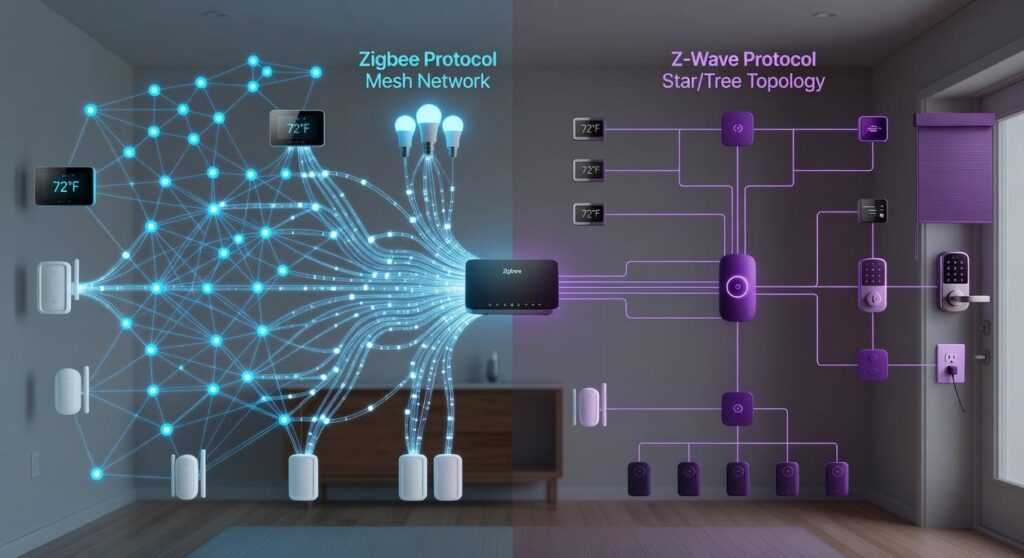
A mesh network is a system where devices don’t just talk to a central router—they talk to each other. In practical terms, that means a smart bulb can pass a signal to a nearby plug, which passes it to a sensor, extending coverage across your home. That’s the backbone of Zigbee and Z-Wave.
Compare that to Wi-Fi: most Wi-Fi setups rely on a single router pushing signals outward. Add too many smart devices and you risk congestion (ever notice your streaming buffer when everything’s online?). Mesh protocols are designed for low-power, small-data devices, so they won’t clog your main internet connection.
Here’s the simple breakdown:
- Mesh (Zigbee/Z-Wave): Devices relay signals device-to-device
- Wi-Fi: Devices connect directly to one router
- Hub-based control: A central hub bridges devices to your phone app
When weighing zigbee vs zwave differences, remember: both rely on a hub, but their frequencies and interoperability vary (pro tip: always confirm device compatibility before buying).
Zigbee vs. Z-Wave: A Head-to-Head Technical Breakdown

When comparing Zigbee vs. Z-Wave, it helps to think of them like two rival tech ecosystems—kind of like iOS and Android, but for your light switches.
Radio Frequency & Interference
Z-Wave operates at 908.42 MHz in the U.S., a frequency that’s far less crowded than the typical home Wi-Fi band. Translation: fewer digital traffic jams. Zigbee, on the other hand, runs on 2.4 GHz, the same frequency used by most Wi-Fi routers, Bluetooth devices, and even your wireless headphones. In busy homes (streaming Netflix, someone gaming, another on a Zoom call), this can occasionally cause interference. That said, modern routers and smart hubs are much better at managing overlap than they were a decade ago—so it’s not exactly the Wi-Fi apocalypse.
Speed and Data Rate
Zigbee offers a higher maximum data rate (up to 250 kbps), making it theoretically faster than Z-Wave’s 100 kbps. But before you picture “Fast & Furious: Smart Home Edition,” remember: these protocols mostly send tiny commands like “turn on” or “motion detected.” In real-world use, the speed difference is usually unnoticeable.
Network Size and Device Limits
Here’s where Zigbee flexes. It supports 65,000+ devices on a single network. Z-Wave caps at 232 devices. For commercial buildings, Zigbee’s scale matters. For the average home? 232 devices is more than enough (unless you’re building Tony Stark’s mansion).
- Zigbee: Massive scalability
- Z-Wave: Practical limits for most households
Power Consumption
Both protocols are designed for low-power operation, ideal for battery-powered sensors. Z-Wave often has a slight edge in efficiency, which can mean fewer battery swaps over time (and fewer moments standing on a chair trying to reset a smoke sensor).
In short, each protocol has strengths—your environment and device count usually make the final call.
Interoperability and Certification: The Open vs. Closed Approach
When building a smart home, have you ever wondered why some devices pair instantly while others refuse to cooperate? The answer often comes down to interoperability—the ability of different devices to work together seamlessly.
The Z-Wave Advantage (Simplicity). Z-Wave is owned by Silicon Labs, and every certified product must meet strict compatibility standards. In plain terms, if it carries the Z-Wave badge, it should talk to every other Z-Wave device. That closed ecosystem reduces guesswork (and those late-night troubleshooting sessions). Think of it like Apple’s tightly controlled App Store—less freedom, but fewer surprises.
The Zigbee Challenge (Flexibility). Zigbee, overseen by the Connectivity Standards Alliance (CSA), is an open standard. Openness encourages innovation and faster product development. But here’s the catch: not all Zigbee devices behave the same way. A Zigbee bulb might connect to a Zigbee hub yet limit advanced features. Sound familiar? That’s one of the key zigbee vs zwave differences homeowners debate.
So where does Matter fit in? Matter builds on Zigbee’s foundation and aims to unify brands under one compatibility layer. If you’re curious about its bigger role, explore what is matter and why it matters for smart homes.
Closed certainty or open flexibility—which matters more to you?
Device Ecosystem: Which Brands Support Which Protocol?
When you press a smart lock and hear that solid, mechanical click, you’re often hearing Z-Wave at work. Z-Wave is a wireless communication protocol (a standardized language devices use to talk to each other) that’s especially popular in professional-grade systems like Ring Alarm and Abode. Brands such as Kwikset, Schlage, and GE/Jasco rely on it for locks, sensors, and switches—devices that need to feel rock-solid and dependable.
Zigbee, by contrast, is everywhere. It powers the soft glow of Philips Hue bulbs, connects inside Amazon Echo devices, links Samsung SmartThings hubs, and even hides inside IKEA’s affordable lighting. Zigbee is known for breadth—meaning widespread adoption across brands—especially in lighting and budget-friendly sensors.
Some argue zigbee vs zwave differences don’t matter anymore. But your “hero” device says otherwise. Love Hue’s warm ambiance? You’re likely in Zigbee territory already (and it feels seamless). Prefer security-first hardware? Z-Wave might feel sturdier in your hands.
Making the Final Decision for Your Connected Home
You now understand zigbee vs zwave differences in reliability, compatibility, and device selection. However, the real win is choosing what serves you best.
Z-Wave offers guaranteed interoperability—meaning certified devices are built to work together (less troubleshooting, more living). That translates to confidence for security sensors and locks.
On the other hand, Zigbee gives you broader device variety and access to brands like Philips Hue. So you gain flexibility and future expansion options.
Before buying, identify the one or two devices you can’t live without and match their protocol. Start there. Build outward.
Making the Right Choice for a Smarter, Simpler Home
You set out to understand the real zigbee vs zwave differences, and now you have the clarity to move forward with confidence. Instead of feeling overwhelmed by compatibility issues, signal range concerns, or device limitations, you can make a decision based on how you actually live and what your home truly needs.
Choosing the wrong protocol can lead to frustrating drop-offs, poor integrations, and wasted money on devices that don’t communicate properly. But when you align your setup with the right ecosystem, your smart home becomes seamless, responsive, and future-ready.
Now it’s time to take action. Evaluate your current devices, map out your automation goals, and commit to the protocol that supports long-term flexibility and stability. For more expert-backed smart home insights, practical integration tips, and trusted guidance on connected living basics, explore our latest resources and start building a smarter home today.
 Thalira Rothwynd writes the kind of smart interior innovations content that people actually send to each other. Not because it's flashy or controversial, but because it's the sort of thing where you read it and immediately think of three people who need to see it. Thalira has a talent for identifying the questions that a lot of people have but haven't quite figured out how to articulate yet — and then answering them properly.
They covers a lot of ground: Smart Interior Innovations, Connected Living Basics, Home Trends Update, and plenty of adjacent territory that doesn't always get treated with the same seriousness. The consistency across all of it is a certain kind of respect for the reader. Thalira doesn't assume people are stupid, and they doesn't assume they know everything either. They writes for someone who is genuinely trying to figure something out — because that's usually who's actually reading. That assumption shapes everything from how they structures an explanation to how much background they includes before getting to the point.
Beyond the practical stuff, there's something in Thalira's writing that reflects a real investment in the subject — not performed enthusiasm, but the kind of sustained interest that produces insight over time. They has been paying attention to smart interior innovations long enough that they notices things a more casual observer would miss. That depth shows up in the work in ways that are hard to fake.
Thalira Rothwynd writes the kind of smart interior innovations content that people actually send to each other. Not because it's flashy or controversial, but because it's the sort of thing where you read it and immediately think of three people who need to see it. Thalira has a talent for identifying the questions that a lot of people have but haven't quite figured out how to articulate yet — and then answering them properly.
They covers a lot of ground: Smart Interior Innovations, Connected Living Basics, Home Trends Update, and plenty of adjacent territory that doesn't always get treated with the same seriousness. The consistency across all of it is a certain kind of respect for the reader. Thalira doesn't assume people are stupid, and they doesn't assume they know everything either. They writes for someone who is genuinely trying to figure something out — because that's usually who's actually reading. That assumption shapes everything from how they structures an explanation to how much background they includes before getting to the point.
Beyond the practical stuff, there's something in Thalira's writing that reflects a real investment in the subject — not performed enthusiasm, but the kind of sustained interest that produces insight over time. They has been paying attention to smart interior innovations long enough that they notices things a more casual observer would miss. That depth shows up in the work in ways that are hard to fake.